> For the complete documentation index, see [llms.txt](https://docs.freeflysystems.com/llms.txt). Markdown versions of documentation pages are available by appending `.md` to page URLs; this page is available as [Markdown](https://docs.freeflysystems.com/flying-sun/overview/system-overview.md).
# System Overview
## Flying Sun 500 Aircraft
The FS500 is built on Freefly’s proven Astro platform.
{% hint style="warning" %}
A thorough understanding of the [Astro Pilot Handbook](https://docs.freeflysystems.com/astro/) is required prior to operation
{% endhint %}
FS500 Aircraft
**Differences from standard Astro:**
* Tether Air Unit in the right battery slot continuously powers the aircraft and lights from the tether.
* Light panels connected to the Tether Air Unit via XT-90.
* Single SL8 battery for backup. If tether power is lost, the aircraft Return To Launch (RTL) on SL8 power. Charge above 90% before flight.
**Required configuration:**
* 2270 high-efficiency props are required. The power they save is budgeted for the lights. Other props can overload the tether and trigger an overcurrent shutdown.
* Astro firmware 2.3 or later, with `FF_ASTRO_TYPE` = Flying Sun. The aircraft will not arm on the Base airframe type.
**Not compatible:**
* Smart Dovetail can’t be installed. The tether strain relief mounting point occupies its location. For tethered payload missions, use Tethered Astro instead.
### Light Panel Assembly
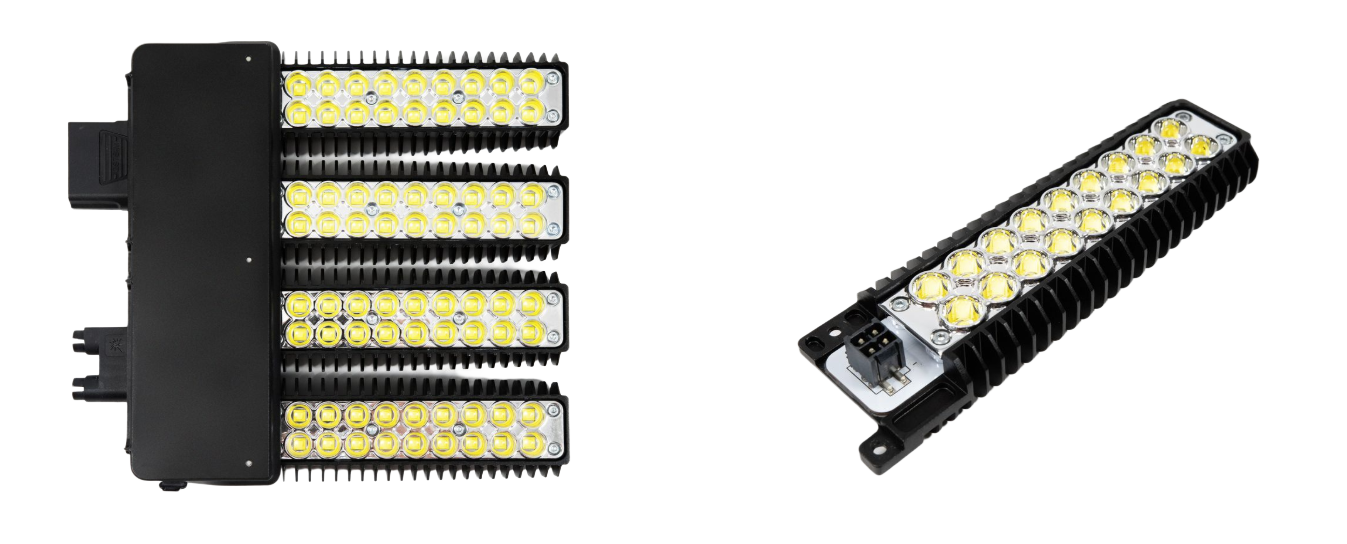
The FS500 illumination system includes two light panel assemblies mounted on either side of the aircraft.
* Each light panel assembly contains:
* 1x LED Driver
* 4x Light Leaves
FS500 Lighting assembly and a single leaf
### Strain Relief Mounting Point
The tether cable clips into the strain relief mounting point located on the bottom of the aircraft. This is a critical component that absorbs pulling and twisting forces from the tether, preventing tension from damaging the high-voltage connector and ensuring a secure, safe connection during flight.
Location of the Strain Relief Mounting Point
{% hint style="danger" %}
To protect the high-voltage connection, the tether cable must be secured in the strain relief mounting point on the aircraft's underside. This point is engineered to relieve tension and absorb mechanical stress from flight maneuvers. Failing to use it can lead to cable damage, power failure, or disconnection of the tether.
{% endhint %}
## Pilot Pro
While Pilot Pro functionality is similar to standard Astro operation, key changes have been implemented to optimize FS500 performance:
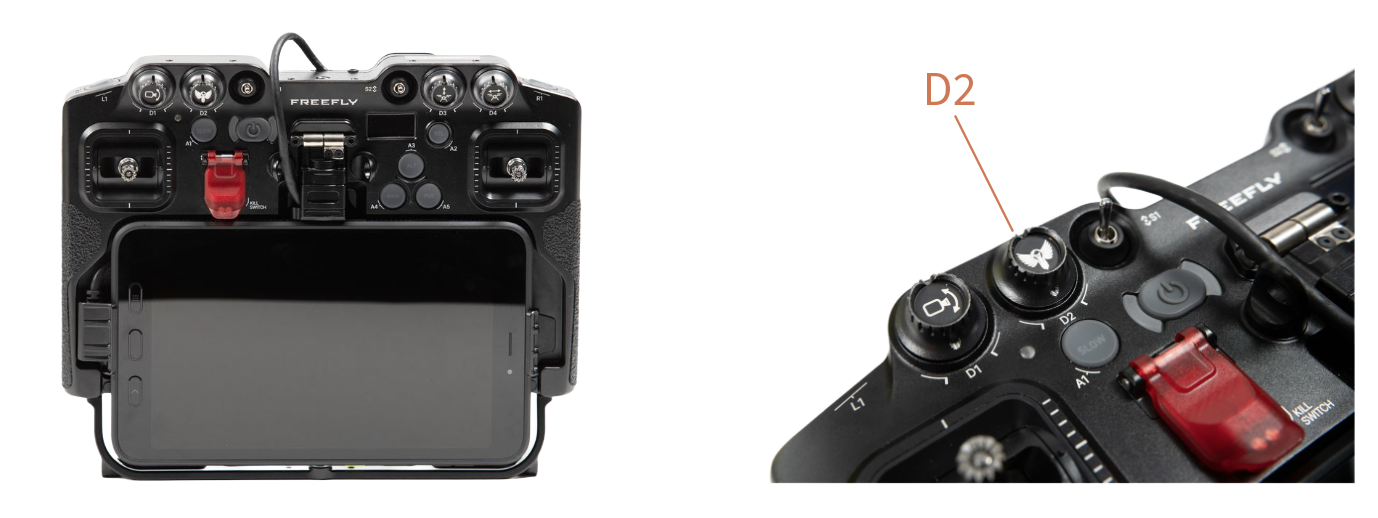
1. Updated D2 knob for light control.
2. Flying Sun's included Pilot Pro is pre-installed with [Flying Sun app](https://docs.freeflysystems.com/flying-sun/overview/flying-sun-app.md).
{% hint style="info" %}
This section assumes familiarity with the Pilot Pro controller. For a complete guide on its operation, [click here](broken://spaces/LOjX8tKksBBX9flThLp2)
{% endhint %}
Location of D2 dial, which controls lighting with FS500
## 3kW Tether System
The FS500 utilizes a 3kW Tether System, which is engineered to deliver a continuous power supply to the aircraft for extended, uninterrupted flight.
#### Ground Unit
1. Main power button.
1. Turn the Ground Unit on/off
2. Backup power switch.
1. Maintains tether tension during power loss
2. Used for recalling the cable after FS500 use
3. AC input power cable port.
1. NEMA L14-30P connector installed
Tether Ground Unit
#### Air Unit
The Air Unit connects to Astro via the top chassis interface. In addition, it includes two dedicated connections to interface with the tether and lights:
1. The LP12 located at the end of the tether cable plugs into the LP12 on the air unit.
1. LP12 connection carries 750V DC. Do not connect or disconnect while powered.
2. The XT-90 on the light panel cable plugs into the XT-90 on the side of the air unit.
3. The Air unit must be installed on the right side of the aircraft as shown in picture.
FS500 with Tether Airunit
---
# Agent Instructions
This documentation is published with GitBook. GitBook is the documentation platform designed so that both humans and AI agents can read, navigate, and reason over technical content effectively. Learn more at gitbook.com.
## Querying This Documentation
If you need additional information that is not directly available in this page, you can query the documentation by asking a question.
Perform an HTTP GET request on the following URL with the `ask` and `goal` query parameters:
```
GET https://docs.freeflysystems.com/flying-sun/overview/system-overview.md?ask=&goal=
```
`ask` is the immediate question: it should be specific, self-contained, and written in natural language.
`goal` is what the user is ultimately trying to achieve, the reason they need the answer. Sharing it helps GitBook give you a better, more relevant answer. A goal is most helpful when it describes the outcome the user wants rather than restating the question. For example, with `ask=how do I create an API token`, a goal like `automate deployments from our CI pipeline` lets GitBook tailor the answer to that use case.
The response will contain a direct answer to the question and relevant excerpts and sources from the documentation.
Use this mechanism when the answer is not explicitly present in the current page, you need clarification or additional context, or you want to retrieve related documentation sections.