> For the complete documentation index, see [llms.txt](https://docs.freeflysystems.com/llms.txt). Markdown versions of documentation pages are available by appending `.md` to page URLs; this page is available as [Markdown](https://docs.freeflysystems.com/flying-sun/flying-sun-app.md).
# Flying Sun App
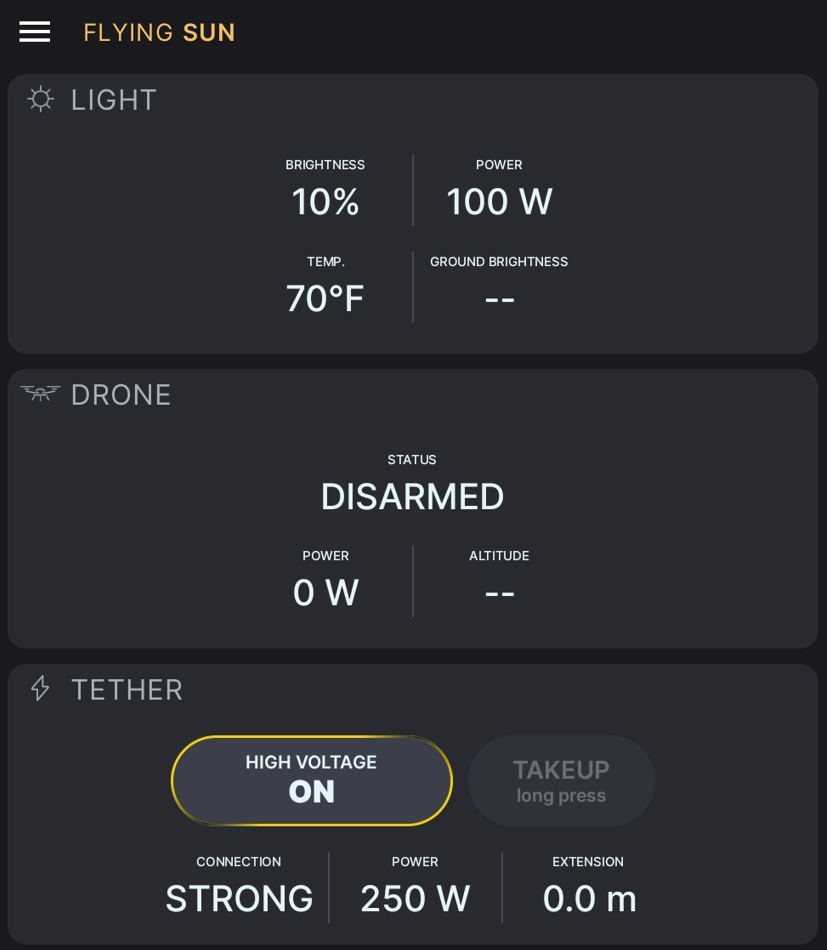
The FS500 features a dedicated 'Flying Sun app,' which comes pre-installed on the FS500 Pilot Pro. This app connects wirelessly to the tether ground unit to monitor and control the system, providing real-time status and tether information during flight
FS500 App Interface
### Monitoring system status
Operators must actively monitor the tether system status throughout the flight. Pay critical attention to the following parameters:
* Power Draw: Continuously monitor power consumption. Do not exceed the 3000W system limit. Exceeding this threshold may result in a system fault or power failure.
* Tether Extension: Monitor the deployed tether length. The tether ground unit will sound an audible alarm when the extension reaches 90m.
{% hint style="info" %}
Tether zero point is when extension length is at 0.0m, there will be more information about this later on.
{% endhint %}
{% hint style="danger" %}
Failure to monitor and respect system limits can lead to equipment failure or loss of the aircraft.
{% endhint %}
### Enable/Disable HV (High Voltage)
To engage or disengage the tether power system, use the Enable/Disable HV button in the app.
* To Enable: Pressing this button activates the system. The Ground Unit will supply 750V DC to the Air Unit, which then converts it to 25V DC to power the aircraft and lights.
* To Disable: Pressing the button again will shut down the high-voltage supply.
{% hint style="danger" %}
Please make sure all personnel are clear of tether and aircraft before enabling HV.
{% endhint %}
### Take up (Retract)
To retract the tether cable for storage:
1. First, ensure the High Voltage (HV) is disabled.
2. PRESS and HOLD the Take Up button on the app to reel the cable into the ground unit.
3. RELEASE the Take Up button on the app to stop
{% hint style="info" %}
The take up function is only available when the High Voltage (HV) is disabled
{% endhint %}
---
# Agent Instructions
This documentation is published with GitBook. GitBook is the documentation platform designed so that both humans and AI agents can read, navigate, and reason over technical content effectively. Learn more at gitbook.com.
## Querying This Documentation
If you need additional information that is not directly available in this page, you can query the documentation by asking a question.
Perform an HTTP GET request on the following URL with the `ask` and `goal` query parameters:
```
GET https://docs.freeflysystems.com/flying-sun/flying-sun-app.md?ask=&goal=
```
`ask` is the immediate question: it should be specific, self-contained, and written in natural language.
`goal` is what the user is ultimately trying to achieve, the reason they need the answer. Sharing it helps GitBook give you a better, more relevant answer. A goal is most helpful when it describes the outcome the user wants rather than restating the question. For example, with `ask=how do I create an API token`, a goal like `automate deployments from our CI pipeline` lets GitBook tailor the answer to that use case.
The response will contain a direct answer to the question and relevant excerpts and sources from the documentation.
Use this mechanism when the answer is not explicitly present in the current page, you need clarification or additional context, or you want to retrieve related documentation sections.