# LR1 Lenses and Expansion

### Default Configuration

By default, the LR1 Payload comes balanced and tuned with the Sigma 24mm F3.5 lens, which covers most mapping applications. However, the gimbal can be re-configured with other lenses and external modules for other use cases!

### Supported Lenses

{% hint style="success" %}
Make sure to balance the gimbal after changing lenses! See the section below
{% endhint %}

<table><thead><tr><th>Focal Length (mm)</th><th>Model</th><th width="120">Weight (g)</th><th width="150">Compatability</th></tr></thead><tbody><tr><td>24 (ships with)</td><td><a href="https://www.sigma-global.com/en/lenses/c021_24_35/">Sigma 404965</a></td><td>228</td><td>Supported</td></tr><tr><td>35</td><td><a href="https://electronics.sony.com/imaging/lenses/full-frame-e-mount/p/sel35f28z">Sony SEL35F28Z</a></td><td>165</td><td>Supported</td></tr><tr><td>50</td><td><a href="https://electronics.sony.com/imaging/lenses/full-frame-e-mount/p/sel50f18f-2">Sony SEL50F18F/2</a></td><td>187</td><td>Supported</td></tr><tr><td>75</td><td><a href="https://www.samyanglens.com/en/product/product-view.php?seq=470">Samyang AF 75mm F1.8 FE</a></td><td>230</td><td>Supported</td></tr><tr><td>50</td><td><a href="https://electronics.sony.com/imaging/lenses/full-frame-e-mount/p/sel50f25g?srsltid=AfmBOopVb5Yga7chOs24Z61HGX_Zjg4IXBT_Tw3En16A9bCmu7wFQKPI">Sony SEL50F25G</a></td><td>174</td><td>Supported</td></tr></tbody></table>

{% content-ref url="/pages/riYkclprrwOhZkphWvCQ" %}
[Changing Lenses](/ecosystem/payloads/lr1-payload/lr1-lenses-and-expansion/changing-lenses.md)
{% endcontent-ref %}

### Lens Settings

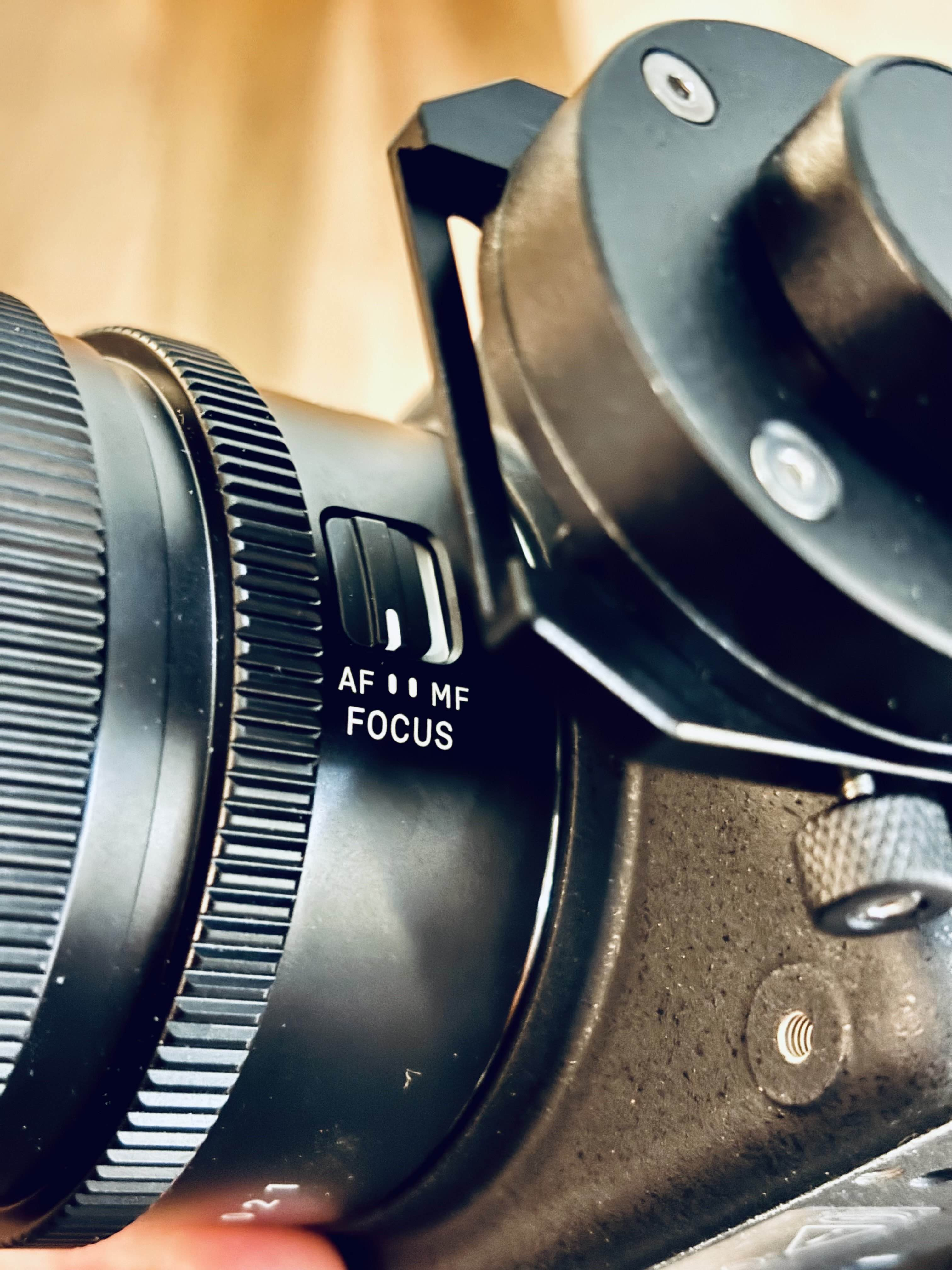
All compatible lenses will have settings to change the focus mode and adjust the aperture. For the LR1, which comes with a Sigma 24mm lens, we recommend you set these both to AUTO.

While it may be tempting to set these manually, setting the focus and aperture to AUTO will expose these settings to be modified any time in AMC.&#x20;

<div align="center" data-full-width="false"><figure><img src="/files/YFE0nhgNn54Pb3fI5HZP" alt="" width="375"><figcaption><p>Aperture Ring set to A (auto)</p></figcaption></figure></div>

<div align="center"><figure><img src="/files/mXgitKrlYP46vcZZwlJf" alt="" width="375"><figcaption><p>Focus set to AF (autofocus)</p></figcaption></figure></div>

### Supported External Modules

The LR1 Payload currently supports two external modules from Freefly:

{% content-ref url="/pages/hsPwPtPBt2yfSuAOKHgr" %}
[Expansion Modules](/ecosystem/payloads/lr1-payload/expansion-modules.md)
{% endcontent-ref %}

If you would like to integrate your own module, check out this section below:

{% content-ref url="/pages/P13FMiod6Vewsqg4R1nv" %}
[Expansion Ports](/ecosystem/payloads/lr1-payload/lr1-lenses-and-expansion/expansion-ports.md)
{% endcontent-ref %}


---

# Agent Instructions: Querying This Documentation

If you need additional information that is not directly available in this page, you can query the documentation dynamically by asking a question.

Perform an HTTP GET request on the current page URL with the `ask` query parameter:

```
GET https://docs.freeflysystems.com/ecosystem/payloads/lr1-payload/lr1-lenses-and-expansion.md?ask=<question>
```

The question should be specific, self-contained, and written in natural language.
The response will contain a direct answer to the question and relevant excerpts and sources from the documentation.

Use this mechanism when the answer is not explicitly present in the current page, you need clarification or additional context, or you want to retrieve related documentation sections.