> For the complete documentation index, see [llms.txt](https://docs.freeflysystems.com/llms.txt). Markdown versions of documentation pages are available by appending `.md` to page URLs; this page is available as [Markdown](https://docs.freeflysystems.com/ecosystem/payloads/flux-lidar/maintenance/flux-software.md).
# Flux Software
## Latest Versions
| Item | Latest Version | How to Update |
| --------------------------- | -------------- | ---------------------------------------------------------------------------------------------------------------------------------------------- |
| Flux Firmware | 1.4.1 | [Download](#flux-firmware-release-notes) the file and [update from the USB drive](#updating-flux-firmware) |
| Flux Mobile App (Pilot Pro) | 0.5.3 | Check the ["updates"](/ecosystem/controller/pilot-pro/maintenance/software-and-firmware-updates.md#app-updates) section in the Freefly Updater |
| Freefly Flow (iPad) | App Store | [App Store](https://apps.apple.com/us/app/freefly-flow/id1522046404?platform=ipad) |
| Flux Desktop App | Beta | [\[Beta\] Flux Desktop App](/ecosystem/payloads/flux-lidar/beta-flux-desktop-app.md) |
{% hint style="info" %}
The Flux Mobile App requires Flux Firmware v1.4.1 or later.
{% endhint %}
## Flux Firmware Release Notes
### Current Version
DOWNLOAD v1.4.1Flux Firmware v1.4.1
* **New:** Support for the Flux Mobile App on Pilot Pro.
* **Fix:** Scan files are now dated from GPS time, so they no longer show up as created in 2024.
* **Improvement:** SBAS is removed from the GNSS configuration, so a mid-flight SBAS shift no longer affects processing.
### Previous Versions
Flux Firmware v1.3.1
* Improves IMU timing
* Improves production processes
* Adds build metadata
{% file src="/files/nZiv8zAytDU9BOJlyqXT" %}
Flux Firmware v1.2.14
* Fixes an issue where sometimes H1 units produce 0 pt scans
* Add support for new IMU variant
{% file src="/files/oY5bOAuoNHGPMOq2cCNN" %}
Flux Firmware v1.1.0
* Minor update to support hardware revision
Flux Firmware v1.0.0
* Initial release for Freefly Flux L1, O1, and H1
## Flux Mobile App Release Notes
Flux Mobile App v0.5.3 (September 2026)
* Initial release, listed as **Freefly Flux** in the Freefly Updater. Monitor Flux and start and stop recording from the Pilot Pro, with no iPad or ethernet cable.
* Requires Flux Firmware v1.4.1 or later.
## Checking the Flux Firmware Version
* In the **Flux Mobile App** on the Pilot Pro, the firmware version is listed under **SYSTEM** next to **FW**.
* In the **Freefly Flow** app on an iPad connected to the Pilot Pro.
* On the Flux web page (see [Troubleshooting](#troubleshooting-the-flux-web-page) below).
## Updating Flux Firmware
Flux updates its firmware from the USB drive.
1. Download the firmware file (`.swu`) from the release notes above.
2. Copy the file to the root of the Flux USB drive. This is the same exFAT drive you record scans to.
3. Insert the drive into Flux and power on the aircraft, or power-cycle it if it is already on.
4. Flux installs the update and reboots. This takes a few seconds and needs no monitoring.
5. Confirm the new version in the Flux Mobile App under **SYSTEM**.
{% hint style="info" %}
Flux only installs a firmware file that is newer than the version it is running. To install the same or an older version, use the forced update below.
{% endhint %}
### Forced Update and System Recovery
Hold the REC button on Flux while powering on the aircraft. Flux boots its factory software instead of the installed update. If a firmware file is on the USB drive, Flux installs it regardless of version and reboots.
Use this to:
* Roll back to an older firmware version.
* Reinstall the current version.
* Recover from a failed or invalid update. With no firmware file on the drive, Flux keeps running the factory software so you can copy a file to the drive and update again.
## Troubleshooting: The Flux Web Page
If the USB drive update does not take, or the Flux Mobile App does not connect, the Flux web page shows the firmware version and can install a firmware file over the link.
{% embed url="" %}
* Power on the aircraft with Flux attached and wait for the Pilot Pro to link.
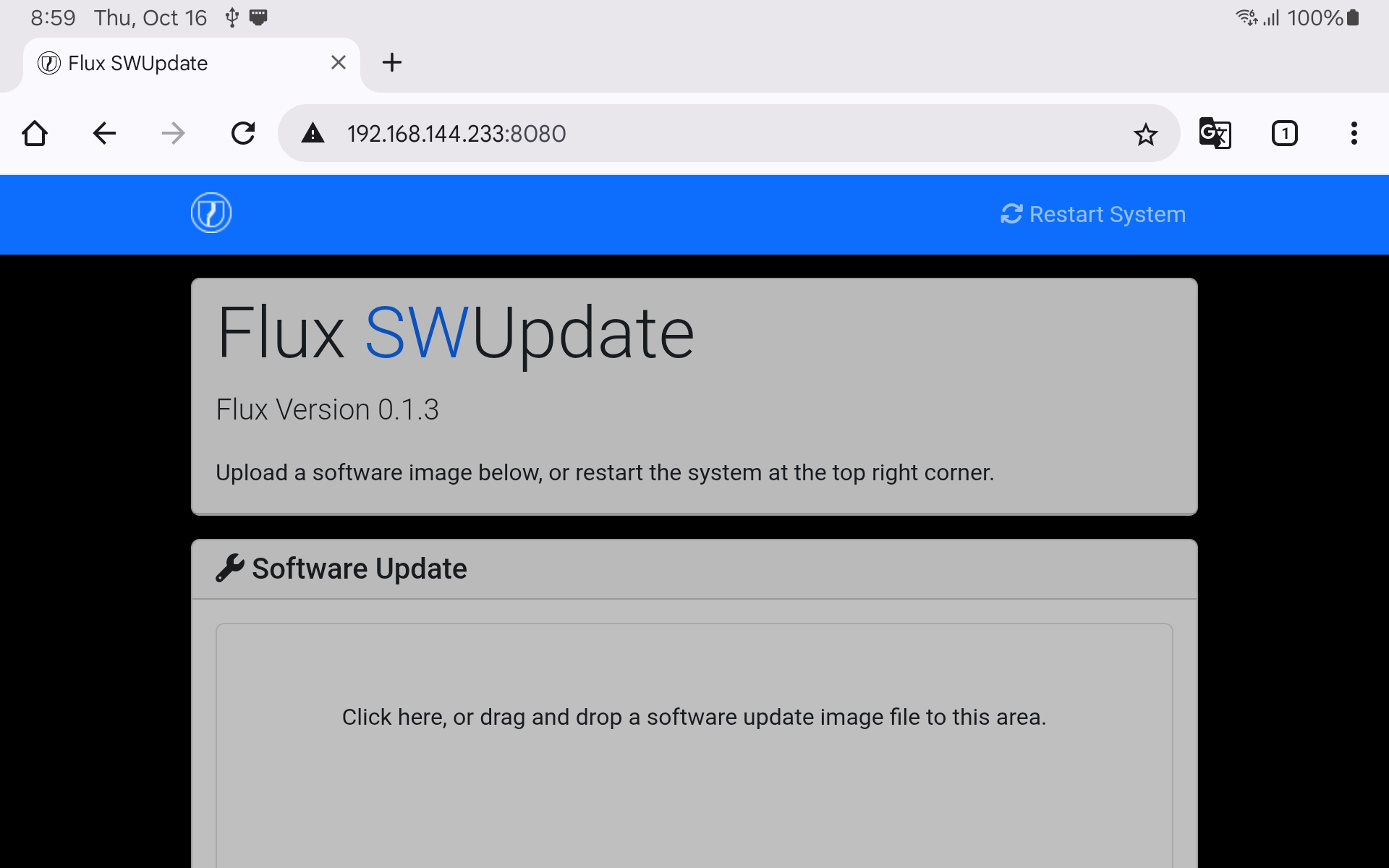
* On the Pilot Pro tablet, open a browser and go to [192.168.144.233](http://192.168.144.233:8080/).
{% hint style="info" %}
The webpage may need to be forced refreshed to see the current firmware version. This can be done by holding control + shift + R on windows or command + shift + R on mac
{% endhint %}
The Flux software version is listed at the top of the page:
To update from the web page:
* Provide the Flux software file
* The update will validate the file and install it
* Flux will reboot once the install is complete
* Refresh the web browser for the version to update
---
# Agent Instructions
This documentation is published with GitBook. GitBook is the documentation platform designed so that both humans and AI agents can read, navigate, and reason over technical content effectively. Learn more at gitbook.com.
## Querying This Documentation
If you need additional information that is not directly available in this page, you can query the documentation by asking a question.
Perform an HTTP GET request on the following URL with the `ask` and `goal` query parameters:
```
GET https://docs.freeflysystems.com/ecosystem/payloads/flux-lidar/maintenance/flux-software.md?ask=&goal=
```
`ask` is the immediate question: it should be specific, self-contained, and written in natural language.
`goal` is what the user is ultimately trying to achieve, the reason they need the answer. Sharing it helps GitBook give you a better, more relevant answer. A goal is most helpful when it describes the outcome the user wants rather than restating the question. For example, with `ask=how do I create an API token`, a goal like `automate deployments from our CI pipeline` lets GitBook tailor the answer to that use case.
The response will contain a direct answer to the question and relevant excerpts and sources from the documentation.
Use this mechanism when the answer is not explicitly present in the current page, you need clarification or additional context, or you want to retrieve related documentation sections.
.jpg?alt=media)
.jpg?alt=media)