> For the complete documentation index, see [llms.txt](https://docs.freeflysystems.com/llms.txt). Markdown versions of documentation pages are available by appending `.md` to page URLs; this page is available as [Markdown](https://docs.freeflysystems.com/ecosystem/controller/pilot-pro/operating-handbook/power-and-charging.md).
# Power and Charging
***
## Quick Start
* The Pilot Pro ships with a 45W USB-C charger and a USB C-C cable (note- some initial Pilot Pro controllers shipped with slower charger model)
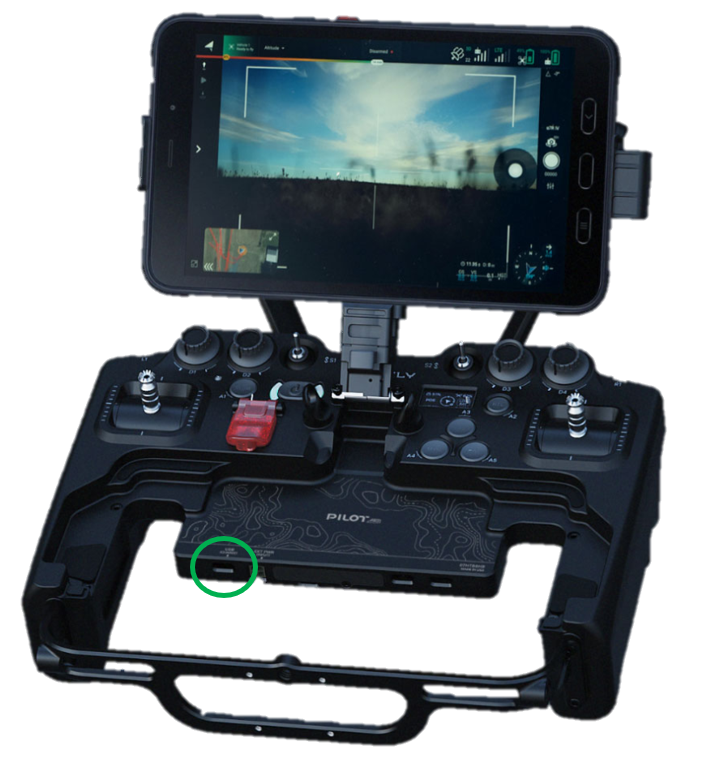
* To charge your controller, plug into the USB power port on the left side of the controller bottom that is also labeled "USB CHARGE
## Internal Batteries
* Controller comes with 50Wh internal batteries that can power the system for up to **5+ hours of operational time**
* Internal batteries are [2S2P LG cells](https://power.tenergy.com/content/datasheet/30708_datasheet.pdf) and they are built in to the controller (not swappable)
## External Batteries
* Controller system allows for a wide variety of external power inputs. Some of the options are:
* Fxlion NANO ONE 50Whr - **Adds up to 4 hours** of operational time
* Freefly SL8 - **Adds up to 14 hours**
* Freefly SL4 - adds up to 7 hours
* USB C PD battery bank (60W+ PD output recommended)
## Charging
* Internal batteries fully charge in 1 hour (charges at 1C) when using a power supply that can deliver >60W
* Tablet fully charges in \~1.5 hours (5000 mAh at 15W charge capability)
* Note: If charging via the microfit connector, the controller will not autostart charging. Manually power on the controller to start charging.
* Fxlion NANO ONE 50Whr - Charges in \~1 hour
* We often use SL8's that have already been flown to charge Pilot Pro - usually there is \~20% charge left on these packs that can be used to run Pilot Pro indefinitely.
## Power Consumption
#### Specs of Ports
* USB C Device Ports → 5V at 1.5A output
* UART Ports → 5V at 1A output
* Radio Power → 24V/20V/15V/12V/9V/5V at 1.25A to 3A (30W max)
* USB C Charge Port → 100W input
* Molex External Power Input → 5-26V up to 100W input\
(12V-26V recommended for powering while in use or fast charging)
#### Consumption Table
Refer to this table for typical power consumption of various devices on the controller system
| Consumer | Continuous Power (W) |
| --------------------------------------------------------------------------------------------------------------------- | -------------------------------------------- |
| Controller | 1W |
| Tablet | 5W (when charged) 15W (when charging at max) |
| Herelink Radios | 4W Max |
| Doodle Radios | 4.25W |
| USB C Device Port | 7.5W (each) |
| GH Expansion Port | 5W (each) |
| **Total** (Full Operational Controller, tablet already charged, no additional USB devices) | 10.25W |
| **Total** (Fully Operational Controller with Doodle Radio, Tablet charging at max, USB and expansion GH at full load) | 45W |
## Troubleshooting
If the controller is failing to charge and is completely unresponsive, connect a USB C charger and hold the power button (on the controller, not the tablet) down for 15 seconds to reset. This might require an additional power cycle for regular operation.
---
# Agent Instructions
This documentation is published with GitBook. GitBook is the documentation platform designed so that both humans and AI agents can read, navigate, and reason over technical content effectively. Learn more at gitbook.com.
## Querying This Documentation
If you need additional information that is not directly available in this page, you can query the documentation dynamically by asking a question.
Perform an HTTP GET request on the current page URL with the `ask` query parameter, and the optional `goal` query parameter:
```
GET https://docs.freeflysystems.com/ecosystem/controller/pilot-pro/operating-handbook/power-and-charging.md?ask=&goal=
```
`ask` is the immediate question: it should be specific, self-contained, and written in natural language.
`goal` is optional and describes the broader end goal you are ultimately trying to accomplish on behalf of the user. GitBook uses it to tailor the answer towards what is most useful for that goal.
The response will contain a direct answer to the question and relevant excerpts and sources from the documentation.
Use this mechanism when the answer is not explicitly present in the current page, you need clarification or additional context, or you want to retrieve related documentation sections.