> For the complete documentation index, see [llms.txt](https://docs.freeflysystems.com/llms.txt). Markdown versions of documentation pages are available by appending `.md` to page URLs; this page is available as [Markdown](https://docs.freeflysystems.com/astro/other-user-manuals/specs-and-interfaces/performance.md).
# Performance
## Weight
#### Astro Max
| Item | Weight (g) | Notes |
| -------------------------- | ---------- | --------------------------------------------------------------------------------- |
| Airframe Weight | 3,523 |
Airframe only (with landing gear) (No smart dovetail, No radio, No FPV)
Airframe only (with landing gear) (No smart dovetail, No radio, No FPV)
|
| Typical Empty Weight | 5,478 | Airframe, Radio, Smart Dovetail, Isolator, FPV, 2x Batteries |
| Max Payload | 1,500 | |
| Max Take Off Weight (MTOW) | 6,950 | |
#### Ecosystem
| Item | Weight (g) | Notes |
| ----------------------------- | ---------- | ------------------------- |
| Battery (SL8-Air) | 1,041 | Astro flies with two SL8s |
| Smart Dovetail + Isolator | 97 | |
| LR1 Payload (with 24mm lens) | 970 | |
| LR1 Thermal Module | 98 | |
| LR1 Laser Range Finder Module | 45 | |
| Ventus OGI Payload | 1,320 | |
| A7R-IV Payload (Legacy) | 1397 | |
| FPV Camera | 50 | |
| Doodle Radio | 79 | |
| Herelink Radio | 62 | |
***
## Thrust To Weight Ratio
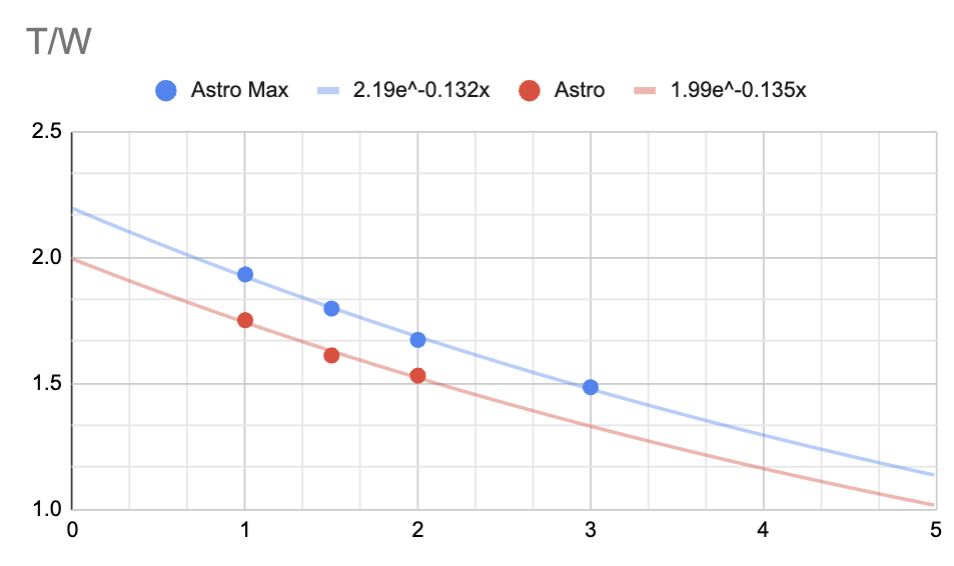
### Astro vs Astro Max Comparison
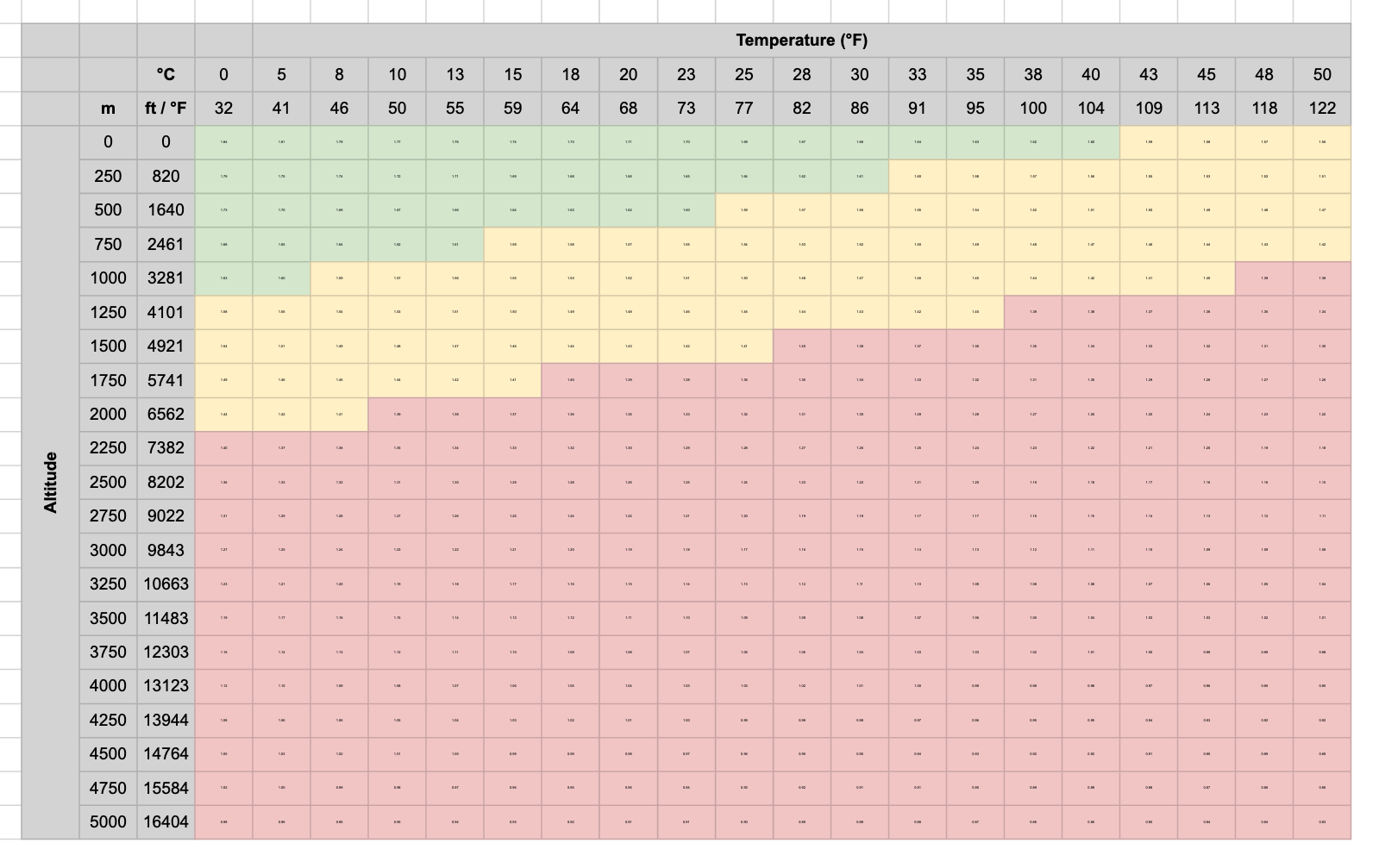
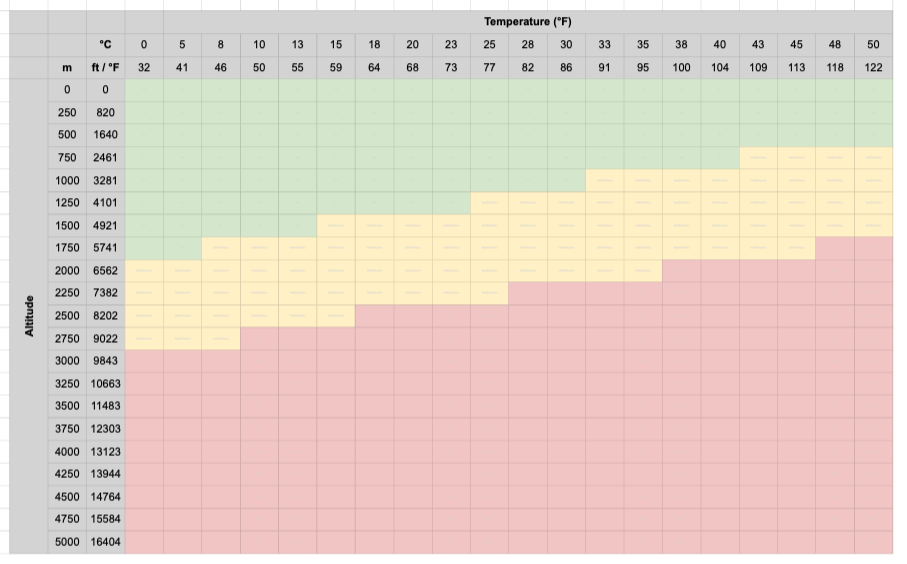
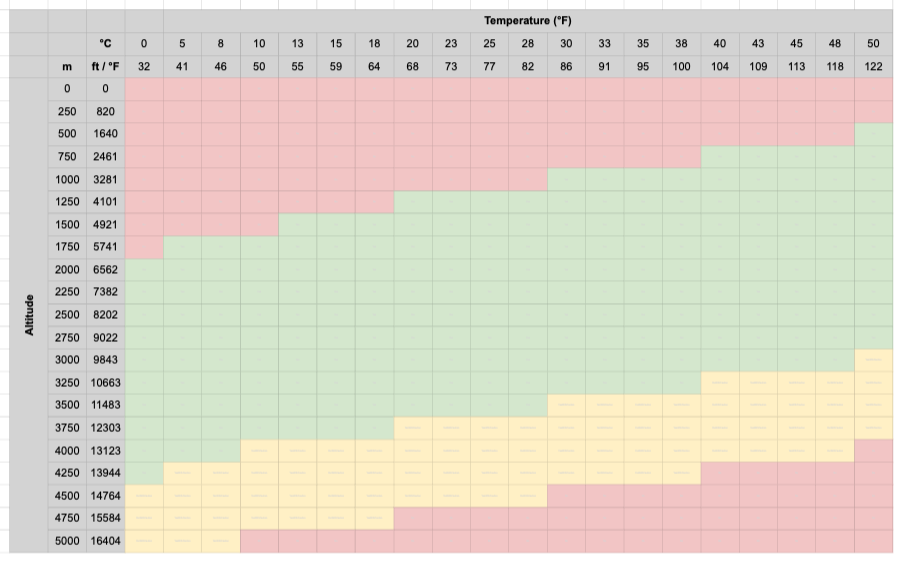
### T/W Performance Charts
* Below T/W Operation Charts are plotted with LR1 Payload as reference.
* Green: Approved Usage
* Yellow: Approved usage; performance limited. Imbalanced payload and wind may cause crashes / altitude loss.
* Red: Prohibited usage.
* Caution: T/W ratio between 1.4 and 1.6 should be flown with caution. These are indicated in yellow in the charts. Imbalanced payload/aircraft in combination with wind may cause crashes. Astro prioritizes its attitude and will lose altitude in these scenarios.
* High Altitude Mode: There are a set of parameters that can be enabled on Astro Max for high altitude flights. (This is not available on original Astro). Read more below.
Astro (Original F45)
Astro Max (Default)
Astro Max (High Altitude Parameters Enabled)
### High Altitude Mode
* **What it is**: A Pilot Pro App feature that enables safe Astro Max operation at high altitudes (up to 15,000 ft / 4,500 m). Astro Max may feel sluggish or have reduced control authority when flying in mountainous terrain or high-density-altitude conditions. This mode increases the motor PWM limits to maintain adequate thrust-to-weight ratio for reliable flight performance.
* **How to use it:**
1\. Open the Pilot Pro App and connect to Astro Max (not available on original Astro with F45 motors).
2\. Navigate to Vehicle Applications, and enable vehicle applications. This needs to be toggled every time the Astro reboots.
\
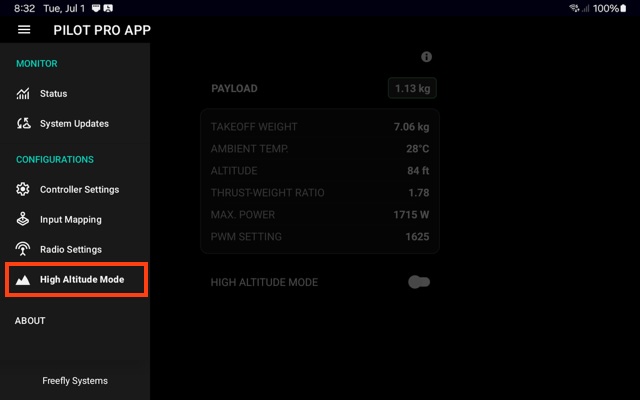
3\. Now that vehicle apps have been toggled on, you will have a new menu item available, called High Altitude Mode. Toggle High Altitude Mode ON before flight at high altitude.
4\. The app displays a real-time thrust-to-weight estimator to confirm adequate performance margins
5\. Toggle OFF when returning to normal altitudes.
* **Requirements:**
* Astro Max. Legacy Astros with F45 motors are **not** compatible.
* Pilot Pro App v2.3 or later
* Astro firmware v2.0.19+
* Fly in Position Mode with default tuning
* **⚠️ Caution:**
* This mode is only approved for Position Mode flight. Do not use in Manual or Altitude mode at low elevations, as increased PWM at sea level could stress the power system during aggressive maneuvers.
* This mode is only approved when flying in position mode with default tuning.
***
## Flight Time
Conducted at Sea Level and 8C temperature
Our flight tests for the Astro (F45) and Astro Max (7010) were conducted by running the batteries from 100% down to 0%. While this is not typical in real-world operations—where a pilot would usually land with some remaining battery for safety—it provides a clear baseline for comparing performance between airframes and payloads. Interestingly, as shown in the “Flight Time versus Flight Speed” chart, hovering draws more power than flying forward at a moderate speed. Because most real flights involve some forward motion (rather than continuous hovering), these 100%–0% hover results end up being a fair representation of typical flights that land with higher battery reserves.
Conducted at Sea Level and 21C temperature
## Flight Speeds
| Flight Mode | Speed (m/s) | Climb (m/s) | Descent (m/s) |
| ----------- | --------------------------- | ----------- | ------------- |
| Position | 15 | 4 | 3 |
| Altitude | no limit | 4 | 3 |
| Manual | no limit | no limit | no limit |
| Mission | 10 (default, user setting) | 4 | 3 |
| Return | 10 | 4 | 3 |
## Range
2 km, line-of-sight
{% hint style="info" %}
The [Limitations Section](https://freefly.gitbook.io/astro-public/astro/pilots-operating-handbook/limitations#range) contains range information along with tips for operating in harsh environments.
{% endhint %}
## Noise
The volume of the aircraft at ground level depends on several factors, including payload weight, wind speed and direction, and the background noise of the environment. The following data was gathered with an Astro in hover carrying the A7R4 camera and gimbal, tested from 5 meters to 100 meters away from the user, from 5 meters altitude to 120 meters altitude.
This data is presented in the ‘A-Weighted’ scale, which approximates the average loudness sensed by the human ear, and is used by the FAA to measure aircraft noise.

In our testing, hovering and forward flight showed similar values of the ground noise produced by the aircraft.

---
# Agent Instructions
This documentation is published with GitBook. GitBook is the documentation platform designed so that both humans and AI agents can read, navigate, and reason over technical content effectively. Learn more at gitbook.com.
## Querying This Documentation
If you need additional information that is not directly available in this page, you can query the documentation dynamically by asking a question.
Perform an HTTP GET request on the current page URL with the `ask` query parameter, and the optional `goal` query parameter:
```
GET https://docs.freeflysystems.com/astro/other-user-manuals/specs-and-interfaces/performance.md?ask=&goal=
```
`ask` is the immediate question: it should be specific, self-contained, and written in natural language.
`goal` is optional and describes the broader end goal you are ultimately trying to accomplish on behalf of the user. GitBook uses it to tailor the answer towards what is most useful for that goal.
The response will contain a direct answer to the question and relevant excerpts and sources from the documentation.
Use this mechanism when the answer is not explicitly present in the current page, you need clarification or additional context, or you want to retrieve related documentation sections.


%20versus%20Astro%20(F45)%20Hover%20Time%20(1).png?alt=media&token=8f85a253-ea1c-400f-98c4-1bda9e3e55da)
%20Flight%20Time%20versus%20Flight%20Speed.png?alt=media&token=f1e3ce28-d54d-48ae-9223-9f9b2629892e)