> For the complete documentation index, see [llms.txt](https://docs.freeflysystems.com/llms.txt). Markdown versions of documentation pages are available by appending `.md` to page URLs; this page is available as [Markdown](https://docs.freeflysystems.com/astro/maintenance/faq-and-troubleshooting.md).
# FAQ & Troubleshooting
## Known Issues and Solutions
| Issue | Solution |
|---|
| Battery cells out of balance | Leave on the charger (under supervision) for about 8 hours |
| Cannot control gimbal | Update Astro and controller.
Software Updates |
| Astro drifts up/down while hovering | Calibrate accelerometer |
| Cannot record video using the Sony a7R-IV, or "unable to write to card, check card speed" | Install a faster SD card into the camera. A V90 card is recommended (90 MB/s minimum sustained write). |
| Can't connect laptop version of AMC to Astro | Change the UDP settings |
| Gimbal is limp with camera on | Ensure the Astro firmware and your gimbal firmware are both up to date. Updating Firmware |
## FAQ
| Question | Answer |
| ------------------------------------------ | ------------------------------------------------------------------------------------------------------------------------------------------------------------------------------------------------------------------------------------------------------------------------------------------------------------------------------------------------------------------------------------------------------------------------------------------------------------ |
| Is there a compatible LiDAR sensor? | Yes! Freefly offers the Flux Lidar payload for super fast in-field processing.
Hovermap ST-X offers autonomous flight in GPS-denied environments.
See all compatible LiDAR payloads.
|
| Is there a thermal sensor for Astro? | Yes, Freefly offers a thermal module upgrade for the Sony LR1 mapping payload.
See all compatible thermal payloads.
|
| Where can I find my Astro's serial number? | The serial number can be found on the belly of the aircraft, near the vibration isolator.
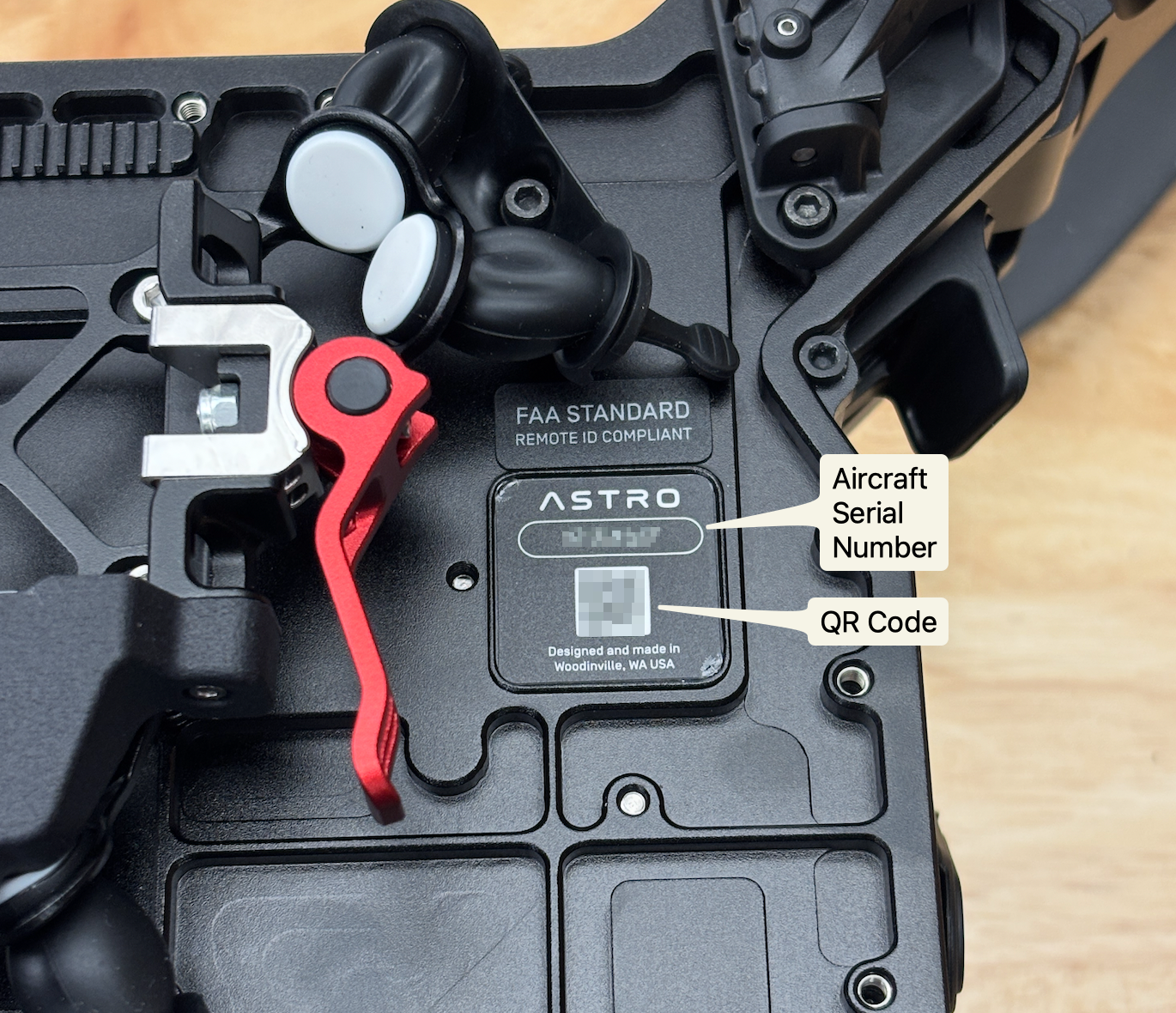
|
| | |
## Advanced Troubleshooting
For in-depth problem-solving, you can check our [Troubleshooting Tree](https://docs.google.com/spreadsheets/d/1DXkk0BmRx9qLbjpBt2KgKYFOQhEGUTcyyQB6rOmb4ac/edit#gid=528435697) or [Astro Support page](https://freeflysystems.com/support/astro-support) for solutions to specific questions or error codes.
If you need more help or can't find what you're looking for, please [contact us](https://freeflysystems.com/contact)!
---
# Agent Instructions
This documentation is published with GitBook. GitBook is the documentation platform designed so that both humans and AI agents can read, navigate, and reason over technical content effectively. Learn more at gitbook.com.
## Querying This Documentation
If you need additional information that is not directly available in this page, you can query the documentation by asking a question.
Perform an HTTP GET request on the following URL with the `ask` and `goal` query parameters:
```
GET https://docs.freeflysystems.com/astro/maintenance/faq-and-troubleshooting.md?ask=&goal=
```
`ask` is the immediate question: it should be specific, self-contained, and written in natural language.
`goal` is what the user is ultimately trying to achieve, the reason they need the answer. Sharing it helps GitBook give you a better, more relevant answer. A goal is most helpful when it describes the outcome the user wants rather than restating the question. For example, with `ask=how do I create an API token`, a goal like `automate deployments from our CI pipeline` lets GitBook tailor the answer to that use case.
The response will contain a direct answer to the question and relevant excerpts and sources from the documentation.
Use this mechanism when the answer is not explicitly present in the current page, you need clarification or additional context, or you want to retrieve related documentation sections.